JAW vs Privy: how they handle keys, accounts & permissions
Say your app needs to act for a user while they are away: renew a 10 USDC monthly plan, or let an AI agent buy API calls overnight.
Say your app needs to act for a user while they are away: renew a 10 USDC monthly plan, or let an AI agent buy API calls overnight. With Privy, the app adds a signer to the user's wallet, an authorization key kept on the app's server, and Privy's policy engine checks each request inside its secure enclave when it is signed [5], [11]. With JAW, the user approves a budget once with their passkey, and the smart account itself refuses anything outside it, onchain [34], [33].
That difference runs through the rest of this comparison. Privy, owned by Stripe since June 2025, is a wallet, login and money platform: email, SMS, social and passkey login, embedded wallets on EVM, Solana and a long list of other chains, and APIs for onramps, cards, KYC, payouts and yield [6], [14], [17]. Its wallets are EOAs by default, with keys split into shares and put back together inside a trusted execution environment to sign [1], [8]. JAW is narrower and goes further on its ground: every user gets a smart account on EVM networks and Solana, the passkey on their device is the signer, limits live in the account, and a lost passkey is replaced through guardians, zkEmail, zkOAuth or zkPassport [32], [20], [47], [46]. Below, the two are compared feature by feature, followed by a straight list of where Privy comes out ahead.
Quick comparison
| JAW | Privy | |
|---|---|---|
| Getting in | A username and a passkey, plus an ENS name if the app has one [22], [23] | Email, SMS, social accounts, passkeys, external wallets or custom auth [6] |
| Key custody | The passkey, in the device's secure enclave. No share on any server [20], [21] | Two Shamir shares, one decryptable only inside Privy's enclave and one sent with each authenticated request, combined in the TEE to sign [1], [2] |
| Default account | Smart account (ERC-4337) [32] | EOA. Smart wallets through third-party providers, and EIP-7702 for gas sponsorship [8], [9] |
| Who checks a delegated key | The account contract, onchain [33], [36] | Privy's policy engine, inside its TEE at signing time [11] |
| New or lost device | The synced passkey arrives through iCloud Keychain or Google Password Manager. With every device lost, guardians, zkEmail, zkOAuth or zkPassport approve a new one, behind a delay the owner can cancel [20], [46] | Log in again in the default setup. Google Drive or iCloud backup in the on-device setup [12] |
| Before signing | A built-in screen with decoded calls and a balance-change preview, or your own UI [26], [27] | Default login and wallet screens, or a whitelabel build [15] |
| Paying for gas | The app's paymaster, or a stablecoin the user picks at approval, with nothing to configure [29] | The app's gas credits, or a "user pays" mode in USDC or USDT on six EVM chains, set up chain by chain in the dashboard [10] |
| Names | An ENS subname per account, such as alice.yourapp.eth [23] | No naming feature in its docs |
| Chains | 20 EVM mainnets and Solana [31], [47] | EVM and Solana, plus Bitcoin, Tron, Stellar, Sui, Aptos, TON and more [14] |
| Free plan | Up to 1,500 accounts [45] | Up to 499 monthly active users [18] |
For the user
Signing up is creating the passkey. On JAW, a new user types a username and confirms with Face ID or a fingerprint. That creates the passkey, the smart account and, when the app has set one up, an ENS name, all in one go [22], [23]. On Privy, users come in through whichever login the app turns on, such as an email or SMS code, a passkey or a social account, and the wallet is created at login [6]. They can add multi-factor authentication with SMS, an authenticator app or a passkey [7]. Privy's range of logins suits people who have never touched a wallet. JAW's bet is that a passkey is just as familiar, and that it should also be what signs.
One gesture to sign in and to pay. A JAW user approves a payment with the same Face ID or fingerprint they signed in with, and the account checks that signature onchain [20]. There is no second secret to manage and no separate wallet password.
A clear picture before every approval. JAW's built-in approval screen decodes calls to known contracts and previews how the user's balances will change [26]. It carries the app's name, logo, colors and font style [25], and teams that prefer their own design can replace it or go fully headless [27], [28]. Privy ships default login and wallet screens, with a whitelabel option for teams that build their own [15].
Stablecoin gas with nothing to configure. When the app does not sponsor a transaction, JAW's approval screen offers stablecoins such as USDC or USDT for the fee, the user picks one, and the app sets nothing up [29], [30]. Privy has two gas modes. In the first, the app pays from its own gas credits, using EIP-7702 on EVM chains [10], [9]. In the second, "user pays", fees come out of the wallet's USDC or USDT balance on six EVM chains, including Ethereum, Base and Arbitrum, but not on Solana. The app switches that mode on in the Privy dashboard and adds each chain and token it accepts [10].
A name that comes with the account. Each JAW account can get an ENS subname under the app's own name, issued offchain by default and readable on every supported network. The app only needs to own a parent ENS name [23]. Privy's docs do not describe a naming feature.
Solana from the same passkey. Privy treats Solana as a first-class chain [14], and JAW now covers it as well. The passkey that controls a user's EVM account also controls a Swig smart wallet on Solana, so sign-up yields both addresses and one ENS name for the pair [47]. Solana fees can be paid in SOL, USDC or USDT, and Solana apps find JAW through Wallet Standard.
Letting apps and agents act for the user
Privy's answer is signers. An app adds an authorization key, held on its own server, to a user's wallet, and can then send transactions for that user, even while they are offline [5]. Each signer can carry its own policy: transfer limits, rolling spending caps, time-bound signers, allow and deny lists for recipients, contracts and networks, and rules on calldata. Privy's enclave checks every one of those rules before it signs [11]. The rule lives with Privy, not with the account.
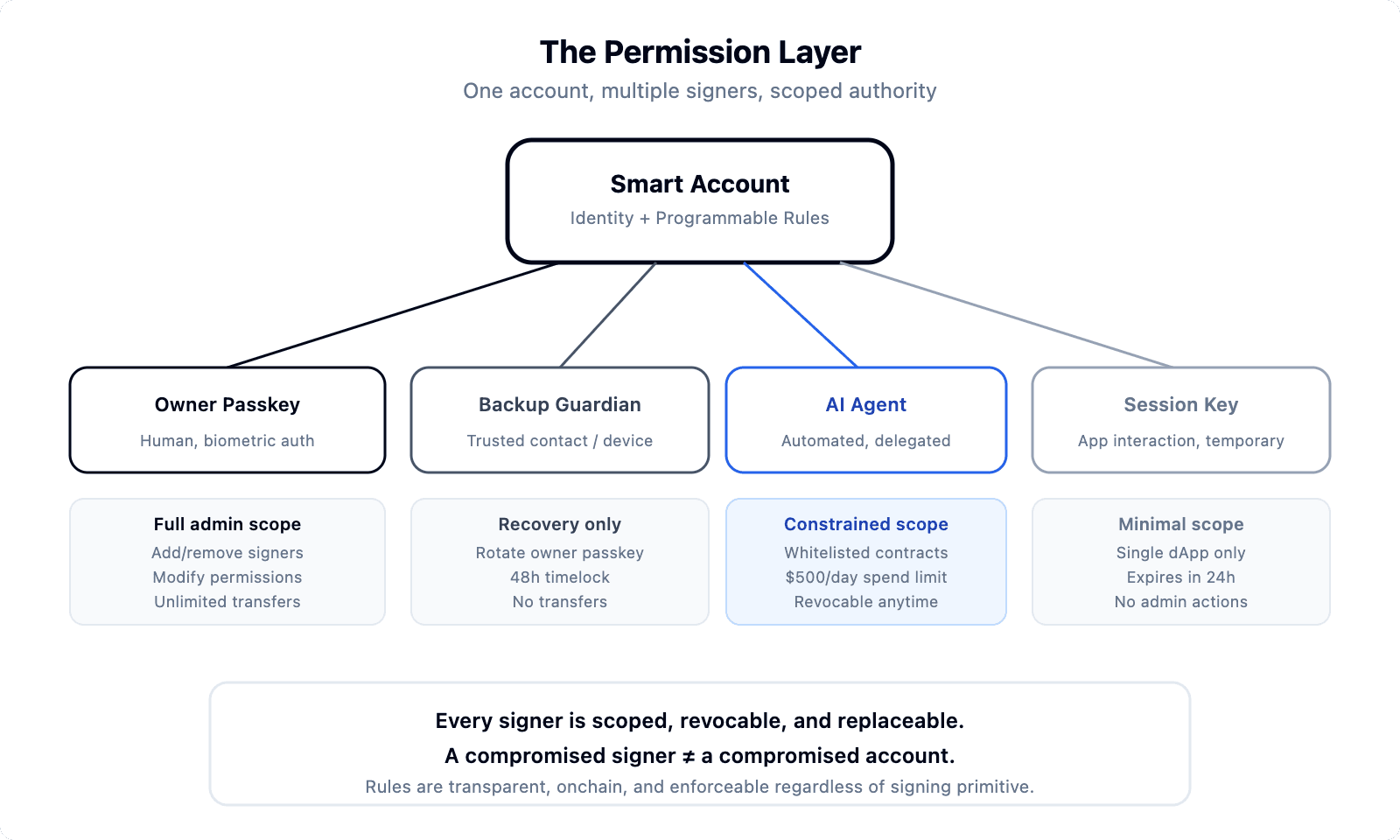
JAW's answer is a permission inside the account. The app asks for one with wallet_grantPermissions, an ERC-7715-style call: a spend limit per token with a reset period from a minute to a year, the contracts and functions allowed, and an end date [34]. In a React app, a monthly USDC allowance for a billing service looks like this [34]:
const { mutate: grant } = useGrantPermissions();

grant({
  expiry: Math.floor(Date.now() / 1000) + 86400 * 365, // one year
  spender: '0xYourBillingService...',
  permissions: {
    calls: [{ target: USDC, functionSignature: 'transfer(address,uint256)' }],
    spends: [{ token: USDC, allowance: parseUnits('10', 6).toString(), unit: 'month' }],
  },
});
The user signs that grant with their passkey, and from then on the PermissionManager contract tests every transaction against it [36]. In JAW's words, "The account is the policy enforcer", so the limit holds whatever key is asking, and the user can revoke it at any moment [33].
Two places where that matters most:
- Monthly billing. The user signs off on 10 USDC a month. The service pulls each payment within that cap, and the user stops it by revoking [35]. Privy's rolling spending caps run from one hour to 72 hours, on EVM only, so a monthly ceiling like this one sits outside what its policy engine can hold [11].
- Autonomous agents. JAW's CLI runs agents in auto mode: one passkey approval at setup, then the agent signs with its own key inside a scoped budget the contract enforces, so a compromised agent key is capped [36]. The CLI's MCP server lets agents send transactions without opening a browser, and x402 lets them pay per API call in USDC [37], [38].
Privy's signers can run these jobs too, though a monthly budget has to be tracked outside its policy engine. The difference is who has the final word: on Privy, it is Privy's policy engine; on JAW, it is a contract inside the user's own account.
When a device is lost
With Privy's default TEE setup, a new phone is not a problem: the user logs in again and the wallet is there, because the key never lived on the old device [12]. Apps on Privy's on-device setup can let users back up a recovery secret to Google Drive or iCloud [12], [3]. Either way, getting back in depends on keeping access to a login method or a cloud account.
JAW treats the two cases separately. Changing phones is handled by passkey sync: iCloud Keychain and Google Password Manager carry the passkey to the new device, end-to-end encrypted [20]. Losing every device is what JAW recovery is for [46]:
- Pick your methods. In advance, the user lists the methods that can vouch for them and sets how many are needed: guardians such as a friend's passkey or a hardware wallet key, zkEmail for an inbox they control, zkOAuth for a social login, or zkPassport for a passport. The zero-knowledge methods prove control without publishing the email, account or passport onchain [46].
- A window to object. Every approved recovery sits behind a delay, and the account can cancel it until the delay runs out [46].
- Nobody in the middle. Recovery proofs carry their own authorization, so any relayer can submit them, and the recovery contract has no owner and cannot be upgraded. JAW has no say in who gets an account back [46].
- All EVM chains in one go. One round of approvals recovers the account on every EVM chain it enrolled [46].
Recovery covers JAW's EVM accounts. Solana accounts are not included.
For the developer
Privy starts in its dashboard: create an app and choose login methods, then install @privy-io/react-auth and wrap the app in PrivyProvider, as in Privy's Next.js starter [15], [16]:
<PrivyProvider
  appId={process.env.NEXT_PUBLIC_PRIVY_APP_ID!}
  config={{ embeddedWallets: { ethereum: { createOnLogin: "users-without-wallets" } } }}
>
  {children}
</PrivyProvider>
Smart wallets and gas sponsorship are switched on in the same dashboard [8], [10]. Privy's SDK coverage is wide: React, React Native (Expo), Swift, Android, Flutter and Unity on the client, and Node, Python, Go and Rust on the server [13].
JAW fits into the stack an app already runs. It is a standard EIP-1193 provider, so a wagmi or viem app adds it as one more connector [19], [39]:
import { createConfig, http } from 'wagmi';
import { base } from 'wagmi/chains';
import { jaw } from '@jaw.id/wagmi';

const config = createConfig({
  chains: [base],
  connectors: [jaw({ apiKey: 'YOUR_API_KEY' })],
  transports: { [base.id]: http() },
});
Accounts are ERC-4337 from the first transaction, full gas sponsorship means plugging in a paymaster such as Pimlico or Etherspot, and React Native apps and servers use the headless Account class [32], [29], [28], [40]. The SDK is open source under Apache-2.0, and the account and permission contracts are MIT-licensed and were audited by Nethermind in October 2025 and March 2026 [43], [44]. Privy's React SDK and Node server SDK are published under Apache-2.0, and its wallet infrastructure is hosted by Privy [16], [14].
Who holds the key
Privy generates each key inside a trusted execution environment, built on AWS Nitro Enclaves, and splits it with Shamir's secret sharing. One share is encrypted with the enclave's key and can only be decrypted inside the enclave. The other, the auth share, is stored encrypted by Privy and sent to the enclave with any request that carries a valid credential, such as a user's session token or the app's secret. The enclave checks the request's authorization and the wallet's policies, then puts the key back together temporarily and signs [1], [2]. It is well-engineered custody. It also means the whole key exists, for a moment, on Privy's infrastructure every time it signs, whether for the user or for a signer the app holds [1].
JAW never assembles a key anywhere but the user's device. The passkey is made in the secure enclave, Face ID or a fingerprint enables it, and the account contract verifies its signature onchain [20]. JAW's servers hold passkey metadata, such as credential IDs and public keys, and nothing that can sign [21]. JAW does run hosted services, keys.jaw.id for the default cross-app mode and a bundler and paymaster proxy, and none of them hold key material [24].
What Privy does better
- Money in and out. Onramps, fiat accounts, cards, KYC, swaps, payouts and yield sit behind one API [14]. JAW has no fiat products today.
- A wider chain list. Beyond EVM and Solana, Privy wallets reach Bitcoin, Tron, Stellar, Sui, Aptos, TON, Starknet, NEAR, XRPL and others [14]. JAW covers EVM networks and Solana [31], [47].
- More login options. Email, SMS, social accounts, external wallets and custom auth, next to passkeys [6]. JAW signs users in with a passkey only [20].
- Native SDKs on more platforms. Swift, Android, Flutter and Unity on the client, Python, Go and Rust on the server [13]. JAW is TypeScript, and reaches React Native through its headless
Accountclass [40]. - Key export. Users can export their embedded wallet's private key and use the same address in another wallet, such as MetaMask or Phantom [4].
Privy and JAW in one app
Teams already on Privy do not have to start over:
- Upgrade in place. JAW's EIP-7702 guide turns an existing Privy embedded wallet or server wallet into a JAW smart account at the same address, with its history and balances. The first transaction signs the upgrade, registers the permission manager and runs the call in one step, and from then on the account has JAW's batching, gas options and onchain permissions [41]. Two things to know: the Privy key keeps control of the account, so signing stays under Privy's login and policies, and because an address can delegate to only one contract at a time, Privy's own EIP-7702 gas sponsorship no longer applies to it [9].
- Privy as the signer. An app can keep Privy for login and use the Privy wallet to sign for a new JAW smart account, at a new address [42].
- Side by side. Because JAW is a standard wallet provider, it can sit next to Privy as one more way to connect [19], [39].
What it costs
Privy charges by monthly active users, meaning anyone with an active session in the past 30 days. Its Developer plan includes 50,000 signatures and $1M of transaction volume a month, and is priced in tiers: free for up to 499 users, $299 a month for 500 to 2,499 (Core), and $499 a month for 2,500 to 9,999 (Scale). Past 10,000 users or 50,000 signatures a month, pay-as-you-go applies, with a $2,000 base fee plus $0.05 per extra user and $0.01 per extra signature, or a custom Enterprise contract [18].
JAW charges by credits, which accounts spend when they act. The free Build plan includes 125,000 credits a month and room for 1,500 accounts. Grow is $200 a month for 1,000,000 credits, with extra usage at $0.2 per 1,000. Creating an account or sending a transaction costs 30 credits, a signature or a permission change 20, and a sign-in costs nothing [45].
The two models suit different apps. Privy's bill follows how many people log in each month, and JAW's follows what their accounts actually do. Privy's prices were checked on October 16, 2026, and JAW's on October 9, 2026.
Which to pick
Pick Privy if your product needs fiat rails, chains beyond EVM and Solana, email or social login, native mobile SDKs, or key export.
Pick JAW if you want a smart account for every user from the first tap, a passkey that signs instead of a key rebuilt on a server, limits on apps and agents that the chain enforces, a name for every account, stablecoin gas with no setup, and recovery through guardians, zkEmail, zkOAuth or zkPassport. If you are already on Privy, the EIP-7702 upgrade adds JAW without moving a single user to a new address.
Get an API key at dashboard.jaw.id and read the docs to start.
Sources
Privy sources accessed October 5, 2026, except 1, 4, 10, 11, 12 and 18 (October 16, 2026). JAW sources accessed October 9, 2026, except 34 (October 16, 2026).
Privy sources 1 to 18, JAW sources 19 to 47
- Wallet architecture: https://docs.privy.io/security/wallet-infrastructure/architecture
- Secure enclaves: https://docs.privy.io/security/wallet-infrastructure/secure-enclaves
- On-device execution environment: https://docs.privy.io/security/wallet-infrastructure/advanced/user-device
- Export a wallet: https://docs.privy.io/wallets/wallets/export
- Add signers: https://docs.privy.io/wallets/using-wallets/signers/add-signers
- Authentication overview: https://docs.privy.io/authentication/overview
- MFA enrollment: https://docs.privy.io/authentication/user-authentication/mfa/enrollment/overview
- Smart wallets: https://docs.privy.io/wallets/using-wallets/evm-smart-wallets/overview
- Integrating with EIP-7702: https://docs.privy.io/recipes/react/eip-7702
- Gas sponsorship and user-paid gas: https://docs.privy.io/wallets/gas-and-asset-management/gas/overview and https://docs.privy.io/wallets/gas-and-asset-management/gas/setup
- Policies and spending caps: https://docs.privy.io/controls/policies/overview and https://docs.privy.io/controls/policies/stateful-policies
- Cloud recovery: https://docs.privy.io/wallets/advanced-topics/new-devices/cloud-recovery
- Docs home (SDK list): https://docs.privy.io/
- Node SDK (chain types, smart wallet types, product APIs): https://github.com/privy-io/node-sdk
- Examples (Next.js starter, whitelabel starter): https://github.com/privy-io/examples
- @privy-io/react-auth on npm: https://www.npmjs.com/package/@privy-io/react-auth
- Announcing our acquisition by Stripe (June 11, 2025): https://blog.privy.io/blog/announcing-our-acquisition-by-stripe
- Pricing: https://www.privy.io/pricing
- Why JAW: https://docs.jaw.id/why-jaw
- Passkeys: https://docs.jaw.id/concepts/passkeys
- Passkey server: https://docs.jaw.id/advanced/passkey-server
- Account.create: https://docs.jaw.id/account/create
- ENS subnames: https://docs.jaw.id/concepts/ens
- Authentication modes: https://docs.jaw.id/configuration/mode
- App name, logo and theme: https://docs.jaw.id/configuration/appName and https://docs.jaw.id/configuration/theme
- Approval screen, call decoding and balance preview (SDK source): https://github.com/JustaLab-co/jaw-mono/blob/main/packages/ui/src/hooks/useAssetPreview.ts and https://github.com/JustaLab-co/jaw-mono/blob/main/packages/ui/src/hooks/useDecodedCalldata.ts
- Custom UI handler: https://docs.jaw.id/advanced/custom-ui-handler
- Account API (headless): https://docs.jaw.id/account
- Gas sponsoring: https://docs.jaw.id/guides/gas-sponsoring
- Paymasters: https://docs.jaw.id/configuration/paymasters
- Supported networks: https://docs.jaw.id/supported-networks
- Smart accounts: https://docs.jaw.id/concepts/smart-accounts
- Permissions: https://docs.jaw.id/concepts/permissions
- Granting and revoking permissions: https://docs.jaw.id/api-reference/wallet_grantPermissions, https://docs.jaw.id/wagmi/useGrantPermissions and https://docs.jaw.id/wagmi/useRevokePermissions
- Subscription payments: https://docs.jaw.id/guides/subscription
- CLI auto mode: https://docs.jaw.id/cli/auto-mode
- MCP server: https://docs.jaw.id/cli/mcp
- Paying for APIs (x402): https://docs.jaw.id/cli/x402
- wagmi connector: https://docs.jaw.id/wagmi/jaw
- React Native: https://docs.jaw.id/guides/react-native
- EIP-7702 upgrade: https://docs.jaw.id/guides/eip7702-upgrade
- fromLocalAccount: https://docs.jaw.id/account/fromLocalAccount
- Source and licenses: https://github.com/JustaLab-co/jaw-mono, https://github.com/JustaLab-co/justanaccount and https://github.com/JustaLab-co/permissions
- Nethermind audits: https://github.com/JustaLab-co/justanaccount/blob/master/audits/Nethermind-October-2025.pdf and https://github.com/JustaLab-co/permissions/blob/master/audits/Nethermind-March-2026.pdf
- Pricing: https://jaw.id/pricing
- Account recovery (JustaRecoveryManager): https://github.com/JustaLab-co/jaw-recovery
- Swig smart wallet, the account JAW uses on Solana: https://onswig.com and https://github.com/anagrambuild/swig-wallet